Plan the whole day, or just dinner: meet Today in Mealhive
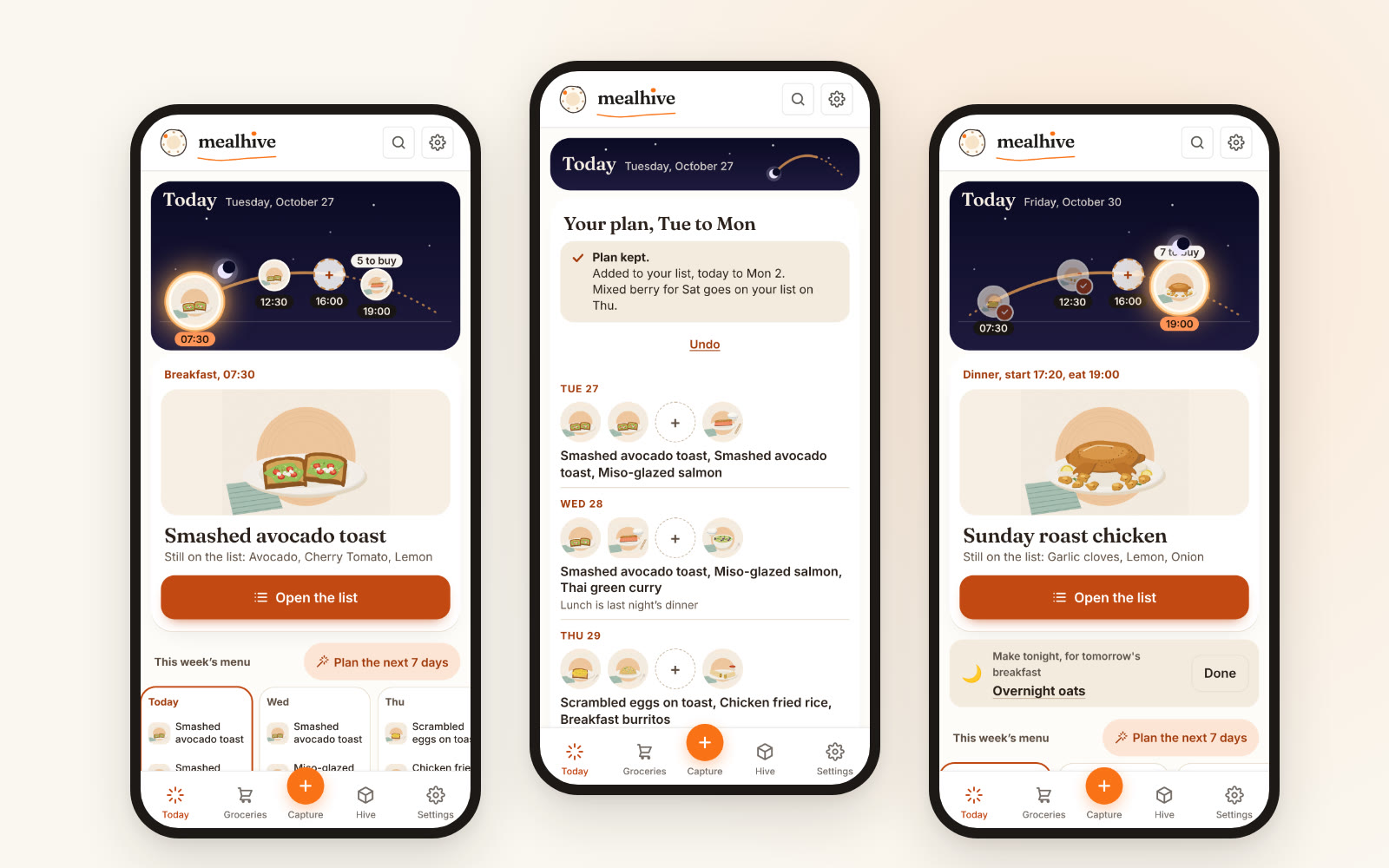
Mealhive can now plan your whole day: breakfast, lunch, a snack and dinner, all on the same shopping list. It is a choice, not a new rule. If you only want dinners planned, nothing changes for you, and dinners stay the default for every new household.
The home screen changed too. It is now called Today, and it shows your day the way you live it: a sun path from morning to evening, with your meals placed on it and the next one shown biggest.
That is the whole update. The rest of this post is why I built it, how we use it at home, and what it does not do yet.
Why full days, and why now
Mealhive started with dinner because dinner is the meal that hurts. It is the 6pm question, the one with the most ingredients and the most arguments. I still think that is the right place to start, and older posts here say so: nail dinner first and add the other meals only if you actually want them.
But a lot of people do want them, and they are not well served by what is out there. They plan breakfasts in a notes app, lunches in their head, and dinners somewhere else. Or they got a meal plan from a personal trainer as a PDF. I had one of those once. I could not tell you where it is now, which is the problem with a plan that lives in a file: it never reaches the kitchen, and it never reaches the shopping list.
Full days is for those people. Same app, same list, more of the day.
How it works at home
Our kids started kindergarten this autumn, and workday mornings got a lot more chaotic. Breakfast was the first thing to go. What fixed it was boring: a plan, and overnight oats made the night before. If breakfast is already in the fridge at 7am, I eat well. If it is not, I eat whatever is fastest.
Today handles the “night before” part for me. When tomorrow’s breakfast is something you make the evening before, Today tells you so in the evening: Make tonight, for tomorrow’s breakfast. That one line does more for my mornings than any amount of good intentions.
Lunches are simpler still. We plan three or four real meals a week and eat the same dishes for lunch the next day. We both work from an office, so the lunch goes in a box, gets heated at work, and replaces the takeout we would otherwise order to the desk. It is the cook once, eat twice idea, extended by a few hours, and the plan does it for you: when you plan full days, lunch can simply be last night’s dinner, and the plan says so on the day (Lunch is last night’s dinner).
What is new, exactly
- A choice on day one. New households pick Just dinners or Full days when they sign up. Dinners is preselected, and you can change it any time in Settings.
- A one-time card for everyone else. If you already use Mealhive, Today shows a single card offering full days. Tap Keep just dinners and it never comes back.
- Breakfast, lunch and snack slots. The plan fills breakfasts from the library and makes lunch last night’s dinner where it can. Each slot can also hold a dish from the library (there are new breakfasts, from overnight oats to French toast) or just a line you write yourself, like “yogurt and berries” or “leftover curry”. Not everything needs a recipe.
- A Snacks menu. Your hive gets a seventh menu for the small stuff.
- One shopping list. Every planned meal, all four slots, lands on the same list, merged and sorted by aisle, shared with your household.
- Plan any stretch. Planning has no fixed week any more. The button names the range, like Plan the next 7 days or Plan Thu to Wed, and days you already planned are kept.
- Buy later. Food that spoils fast, planned for later in the week, waits in a collapsed Buy later group on the list and moves up on the day it makes sense to buy it.
What it does not do (yet)
Full days helps you plan your meals. It does not track calories or macros for you, apart from a rough estimate. Most recipes carry an approximate nutrition line per serving. It comes from the recipe page when the page publishes one, from you if you type it in, or otherwise from an estimate based on the ingredients (how the calorie estimates work). When every meal of a day has those numbers, the plan shows a rough total for the day, and you can set an optional daily target in Settings to plan against. That is as far as it goes. There are no personal eating suggestions and nothing that tells you what to eat. I would like Mealhive to get there, fully customizable and only for people who actually want to follow numbers, but it is not here yet and I would rather say so than imply otherwise.
It also does not push full days on anyone. If you have read our advice to plan dinners and let lunch be lunch, that advice still stands for most households. Full days is for when you know you want more.
Who this is for
Everyone, honestly. Families with chaotic mornings. Couples who take lunch to the office. People who train and want the whole day in one place. And people who did not know they needed it: someone who tried it told me exactly that, that they had no idea they needed an app like this until they used it. That is my favorite kind of feedback, because it means the problem was real and just unnamed.
Where Mealhive fits
Mealhive is a family meal planner: save recipes from any site or social post, plan the days ahead, and get one shared shopping list sorted by aisle. Today and full days are part of the free plan. If you are new, sign up here and choose dinners or full days on day one. If you are already in, open the app: Today is waiting.
FAQ
Can Mealhive plan breakfast and lunch, not just dinner?
Yes. Choose Full days, at sign-up or later in Settings, and Mealhive plans breakfast, lunch, a snack and dinner. Every meal goes on the same shopping list. Dinners only stays the default if you never change it.
Do I have to use a recipe for every meal?
No. A breakfast, lunch or snack slot can hold a dish from the library or a short line you write yourself, like “yogurt and berries”. Written items go in your plan without needing steps.
Does Mealhive count calories or macros?
Only roughly. Most recipes show an approximate nutrition line per serving, taken from the recipe page, typed in by you, or estimated from the ingredients. When every meal of a day has numbers, a full-days plan shows an approximate day total, and you can set an optional daily target yourself. Mealhive does not suggest what to eat, and you can hide the numbers in Settings.
What is the Today screen?
Today is Mealhive’s home screen. It shows your day as a sun path from morning to evening with your planned meals on it, the next meal largest, and this week’s dishes below.
Is full days free?
Yes. Today, full days and the shared shopping list are part of Mealhive’s free plan. Plus adds unlimited AI recipe capture.